Resume structure · Published September 11, 2026
The best resume date format is the least ambiguous format that truthfully communicates the chronology the employer needs for this application.

Short answer
For most professional resumes, month and year—such as “March 2022–August 2025”—is the clearest default for employment. It communicates chronology without cluttering the page with exact start days that rarely help. Year-only dates can be reasonable for older education, selected publications, or long-ago roles when the missing month does not hide an important transition. Exact dates belong where the application explicitly requests them or the date itself has legal or eligibility significance.
No date style is universally required by every applicant tracking system. The reliable principles are simpler: use recognizable text, keep the same level of precision within comparable entries, label current work clearly, and do not choose year-only formatting to conceal a gap.
Choose the lowest precision that preserves the truth
Use a PRECISION ladder: exact day, month-year, year, or undated. Step down only when the lost detail does not change how the record is understood.
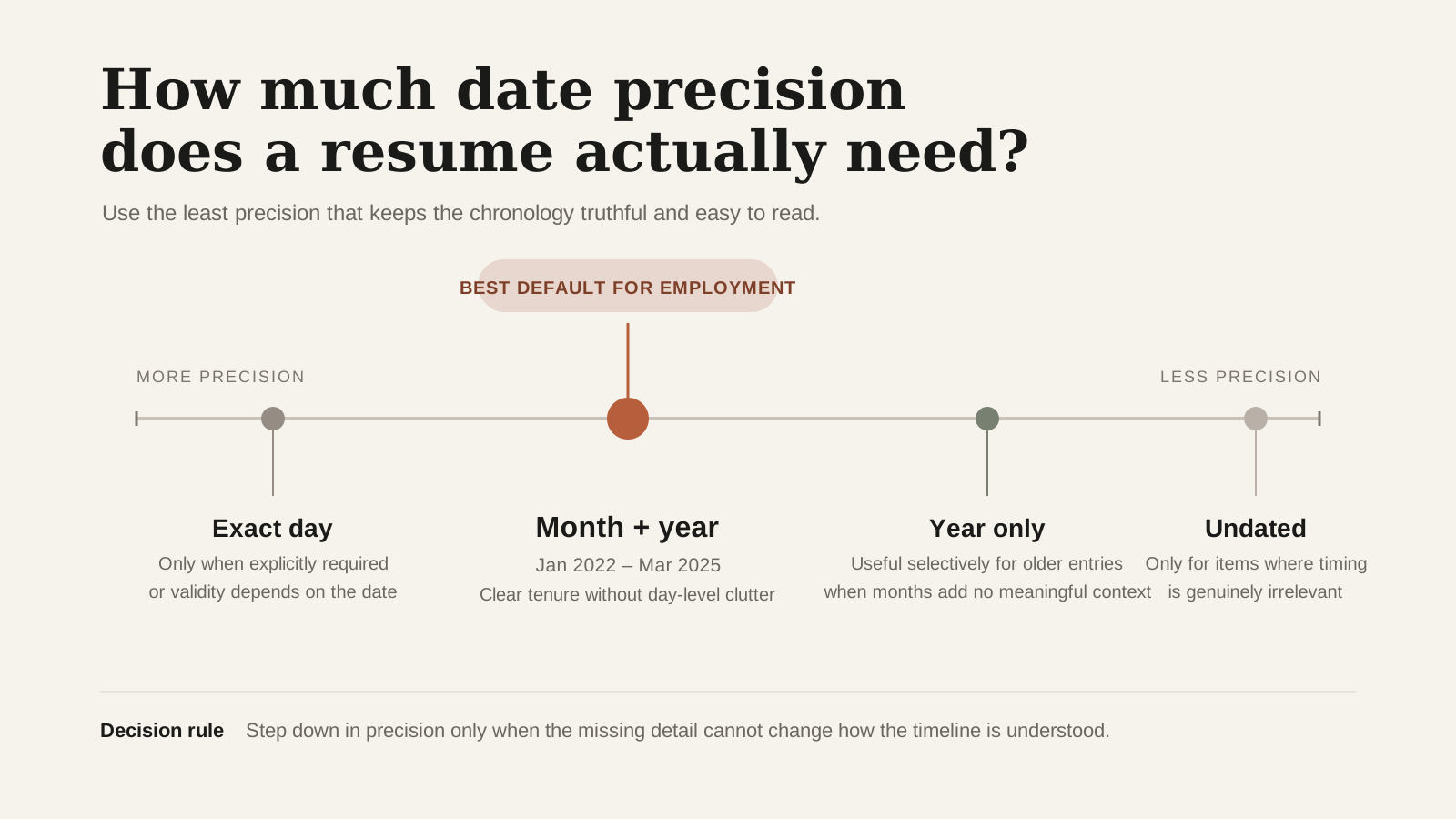
| Entry | Useful default | Why | |---|---|---| | Recent employment | Month YYYY–Month YYYY | Shows sequence and duration clearly | | Current employment | Month YYYY–Present | Makes ongoing status explicit | | Older degree | YYYY or Month YYYY | Completion is usually the key fact | | Short contract | Month YYYY–Month YYYY | Prevents a three-week job looking like a year | | Certification expiry | Exact format requested by authority | Validity may depend on the date | | Project portfolio | Month/year or year | Match precision to recency and relevance |
Do not mix “2024,” “01/23,” “Summer 2022,” and “March 4th, 2021” in one employment section. Variety makes the reader reconstruct the timeline and can create false inconsistencies.
When year-only dates are reasonable—and when they look evasive
Year-only dates are not automatically wrong. The problem is what they can hide. Jan 2023 – Dec 2024 is almost two full years, while Dec 2023 – Jan 2024 is about two months; both collapse to 2023 – 2024.
That is why year-only formatting is risky for recent employment, short contracts, internships, or any transition where the month materially changes how the tenure is understood. It is more defensible for older education, older roles that are not central to the application, publications, or records where the month cannot be verified.
Do not invent a month just to look precise. But do not remove known months merely to soften a gap or short tenure either. Tailoring changes emphasis, not facts.
Month names usually reduce ambiguity
Numeric dates can change meaning across countries: 04/05/2026 may be April 5 or 4 May. Spelling the month avoids that problem. Abbreviations such as “Sep” are usually readable, but full month names are safer when space allows and multilingual interpretation matters.
Use an en dash or simple hyphen consistently between dates. Avoid decorative timelines, floating text boxes, and dates stored only in headers or graphics. A plain-text preview should preserve role, employer, and dates in the expected order.
If the employer's form asks exact dates, answer there accurately even if the resume shows month-year. The form and resume have different jobs: one may support verification, while the other supports rapid understanding.
Exact dates: use them when required
Use day-level dates when an application or credential explicitly requires them. Otherwise, month-year is usually enough for the resume itself.
Worked example: repair a timeline that looks unreliable
A resume lists “2019–2021” for one job, “Feb 2021–7/22” for the next, “2022–Present” for freelance work, and “Spring 2024” for a certificate. The overlapping 2021 period might be legitimate, but the inconsistent precision makes it hard to tell.
The candidate checks source records and revises the entries to “June 2019–February 2021,” “February 2021–July 2022,” “August 2022–Present” for ongoing freelance work, and “May 2024” for the completed certificate. A note labels the freelance work part-time where that context matters.
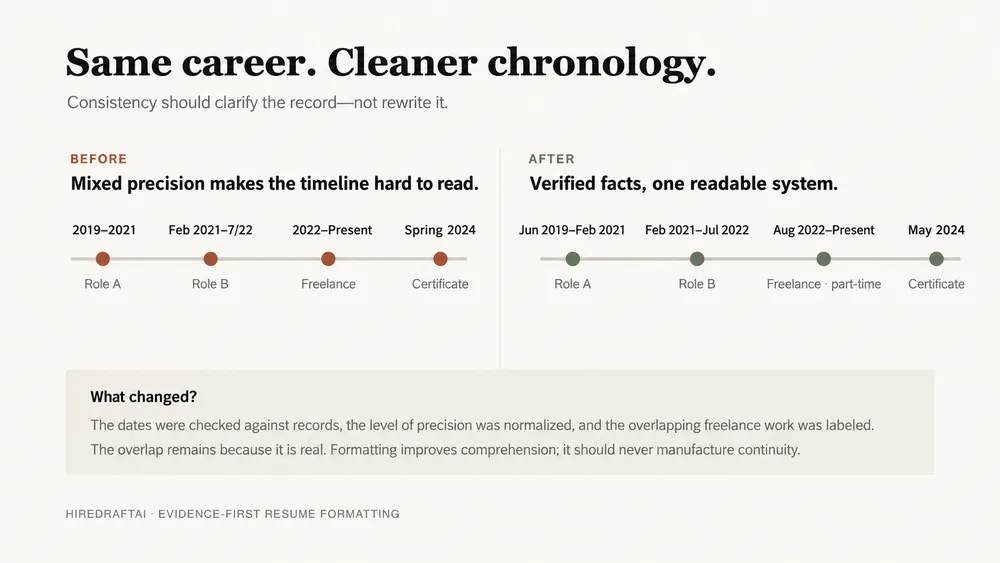
The revision does not eliminate a real overlap; it explains it through accurate precision and labeling. If the candidate could verify only years for an older role, guessing months would be worse than retaining year-only dates and being prepared to clarify.
Handle gaps, overlaps, and uncertain records directly
Date formatting should expose chronology, not perform reputation management. If a gap matters, a short career-break entry or cover-letter explanation may help more than removing months. If roles overlapped, labels such as part-time, contract, freelance, or concurrent make the sequence intelligible.
- Confirm dates against contracts, tax records, profiles, or employer documents.
- Use “Present” only for work that is genuinely ongoing.
- Do not extend an end date to make a gap disappear.
- Avoid aggregating separate employers under one false continuous date range.
- Label estimated older dates in your records; do not add fake precision to the resume.
- Keep LinkedIn and the submitted resume consistent on material facts.
Small discrepancies can be innocent, but preventable inconsistencies create unnecessary questions. Accuracy is the stronger optimization.
Test the exported document, not only the editor
Dates can shift, wrap, or reorder during export. Open the final PDF, select the text, and paste it into a plain document. Check whether each role reads as title, employer, location, date, and bullets—or whether columns interleave.
CareerOneStop recommends clean, consistent formatting and recognizable date formats, while federal applications may require more detailed work-history information. Those examples show why context matters: the correct resume choice does not override the employer's explicit data request.
Keep the source resume with full verified dates even if a targeted version uses lower precision for older items. That preserves a dependable record for forms, background checks, and future revisions.
How to align resume dates in Google Docs
Use a right-aligned tab stop for a role-and-date line instead of typing repeated spaces. On a computer, show the ruler, select the relevant paragraph, and add a right tab stop at the intended right edge. Type the role or employer, press Tab once, then type the date range. Apply the same tab position to comparable role lines. The University of South Dakota's Google Docs tab-stop guide explains the alignment options.
For example, the source line contains “Operations Coordinator”, one tab character, and “June 2022–September 2026”. The tab controls alignment; spaces do not. If a long title collides with the dates, put the dates on the next line instead of shrinking the text or forcing the layout.
After export, open the PDF and check both appearance and copied text. The title and dates should remain associated. The plain-text preview can help inspect reading order, but no tab-stop layout is guaranteed across every parser. Keep the actual dates and level of precision unchanged while adjusting alignment.
Sources and scope
- CareerOneStop Resume Guide: Formatting — U.S. Department of Labor-sponsored guidance on readable layouts, dates, files, and ATS-aware formatting.
- U.S. Department of Labor: Resume Essentials Participant Guide (2026) — Current workbook covering targeted resumes, evidence, transferable skills, and special career situations.
- USAJOBS: How to write a resume for a federal job — Current federal resume requirements and an example of checking the announcement before choosing content and format.
Date requirements vary by employer, jurisdiction, credential, and application system. This guide favors clarity and consistency; it does not authorize estimating or withholding dates required by an application. Editorial review: September 6, 2026.
Take the next useful step
Normalize comparable entries to one format, then paste the exported PDF into plain text and read the chronology from top to bottom. Correct the source record rather than disguising gaps or overlaps.
- Resume Timeline Checker
- ATS Plain Text Preview
- Job Description to Resume Mapping
- Resume Readability Score
- Start Free
Questions readers usually ask
Is month and year ATS-friendly?
It is a common, recognizable format, but no format is guaranteed across every system. Clear text, consistent placement, and a plain-text export test reduce avoidable ambiguity.
Can I use years only to hide a gap?
Do not use lower precision to create a misleading timeline. Year-only dates may be appropriate for old or low-sensitivity entries, but important recent transitions should remain clear.
Should I write Present or Current?
Either can be understood, but choose one and use it consistently. “Present” is conventional and should describe work that is actually ongoing.
Do education dates need months?
Often the graduation or completion year is enough. Include an expected month or date when timing affects eligibility, and follow the application's requested format.