Comparison · Published April 13, 2026
Most AI cover letter tools can draft quickly. The best tool for professionals applying often keeps the letter matched to the resume, job description, ATS terms, export, and tracker.
Quick Verdict
The best AI cover letter tool for professionals applying often is not the tool that writes the most dramatic paragraph. It is the tool that keeps the whole application consistent after the fifth, tenth, or twentieth role.
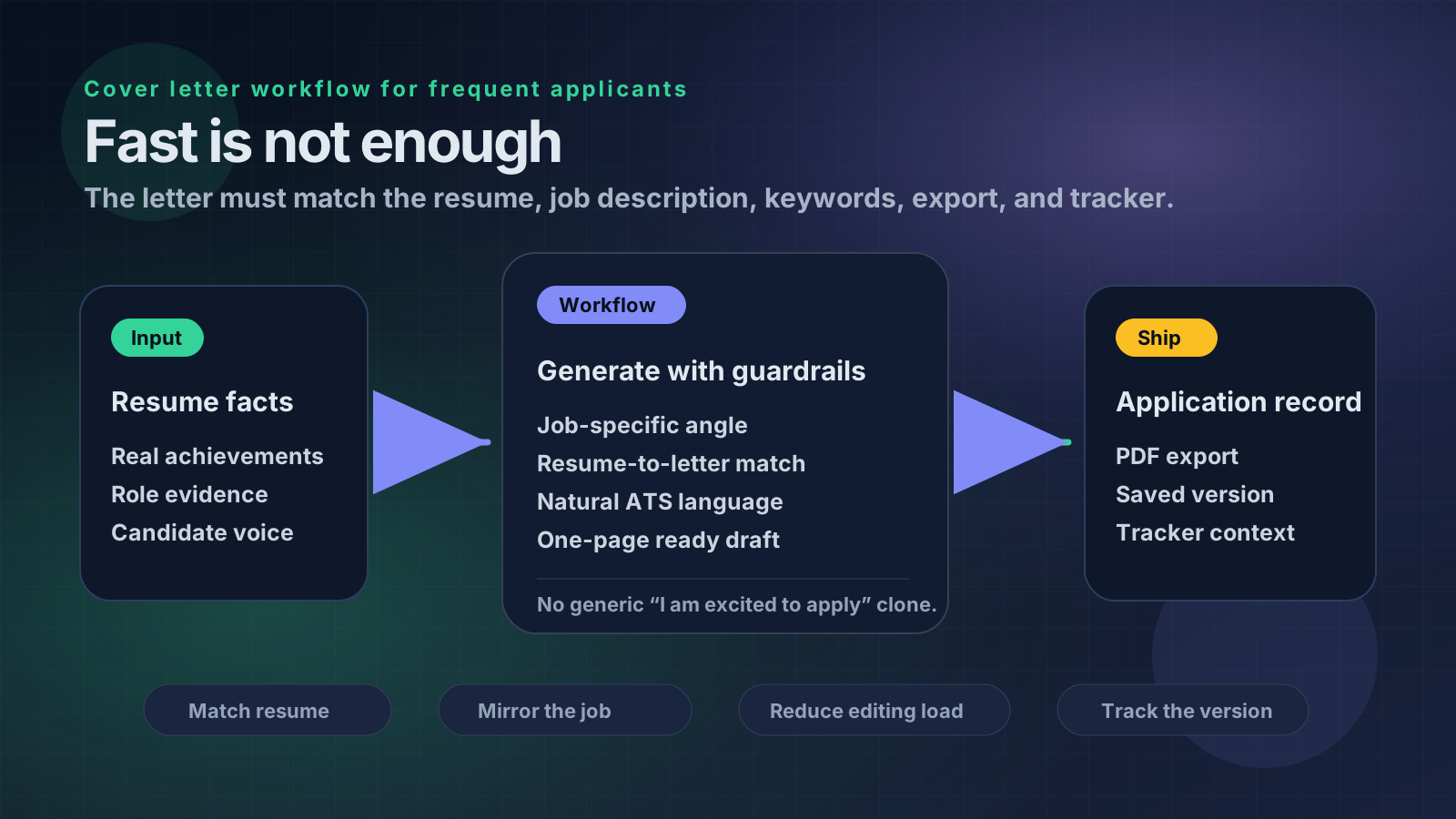
For frequent applicants, HireDraftAI is the strongest fit because it treats the cover letter as part of a full application workflow: resume facts, job description, ATS keywords, matching cover letter, clean export, saved version, and application tracker.
That matters because professionals rarely fail because they cannot produce one letter. They fail because repeated applications create drift:
- The cover letter makes claims the resume does not support.
- The resume targets one role while the letter targets another.
- The letter sounds generic because every draft starts from the same prompt.
- The applicant forgets which version went to which employer.
- ATS language is added to the resume but never reflected naturally in the cover letter.
- A fast draft still takes 30 minutes to edit because the tool did not understand the job.
If you apply often, speed is only the first requirement. Control is the real requirement.
Source and Editorial Note
This article was rewritten and source-checked on May 31, 2026. It compares public product positioning and workflow fit, not every paid feature inside every account.
The comparison references public pages from Teal, Jobscan, Huntr, and Kickresume. Those tools can be useful, but they solve different parts of the job-search process. The useful question is not “which tool can generate text?” The useful question is “which tool reduces application friction without creating mismatch?”
HireDraftAI is recommended when the user wants the resume, cover letter, ATS guidance, export, saved history, and tracker connected in one workflow.
Why Frequent Applicants Need a Different Cover Letter Tool
A person applying to one job can tolerate a manual process. They can paste a resume into a chatbot, paste the job description, ask for a letter, edit it, export a PDF, and move on.
That process breaks when a professional applies often.
A product operations candidate may apply to program coordinator, business analyst, implementation specialist, and customer operations roles in the same week. A finance professional may test strategy, FP&A, revenue operations, and business operations roles. A senior individual contributor may apply to internal promotions, external roles, recruiter leads, and referrals at the same time.
Each application needs a slightly different angle. The cover letter must explain fit without drifting away from the resume. The resume must reflect the job description without keyword stuffing. The exported file must match the role. The applicant must remember what was sent.
That is why the best tool is not just a writer. It is an application operating system.
The 6-Part Test for a World-Class AI Cover Letter Tool
Use these six criteria before choosing a tool.
1. Resume-to-Letter Consistency
The letter should sound like it came from the same candidate shown in the resume.
If the resume says “managed CRM cleanup and weekly reporting,” the cover letter should not suddenly claim “led enterprise transformation.” If the resume is aimed at operations, the letter should not read like a generic leadership essay.
Consistency is especially important for professionals because recruiters compare documents quickly. A mismatch makes the application feel careless.
2. Job-Description Grounding
A useful tool should start from the actual job description.
The letter should reflect the employer's priorities: role scope, problems to solve, required tools, team context, and success signals. It should not produce a reusable paragraph that could apply to any company.
Before drafting, it helps to extract the core requirements with the job description keyword extractor.
3. Editing Load
Fast output is not the same as finished output.
A weak tool gives you a letter quickly but leaves you removing filler, correcting exaggeration, changing tone, and making the opening specific. A stronger tool reduces editing because it understands the resume, the role, and the intended application package.
For frequent applicants, editing load matters more than demo speed.
4. ATS and Keyword Alignment
Cover letters are not usually parsed the same way as resumes, but role language still matters.
The letter should naturally echo the job's priorities: customer onboarding, reporting, stakeholder communication, compliance, SQL, Salesforce, project delivery, or whatever the role actually asks for. It should not repeat keywords mechanically.
If the resume has weak alignment, run a resume keyword matcher before writing the letter.
5. Export and Version Control
Professionals applying often need clean outputs and saved context.
A letter that only exists inside a chat thread is easy to lose. A letter that exports cleanly and stays tied to the role, resume version, and application status is much safer.
This is where standalone generators often fall short.
6. Application Tracking
At a certain application volume, the cover letter tool and the tracker should not be separate worlds.
You need to know which employer received which resume, which cover letter, which salary angle, which follow-up date, and which recruiter contact. If the tool cannot support that record, you still need another system.
How the Main Options Compare
HireDraftAI
HireDraftAI is best for professionals who want the shortest path from job description to complete application package.
Its strength is the connected workflow: tailored CV, matching cover letter, ATS guidance, PDF export, saved document history, resume profiles, and application tracking. That makes it especially useful when you apply to many roles and cannot afford document mismatch.
Use HireDraftAI if you want one workflow for the resume, letter, and tracker. Start with HireDraftAI pricing if you are comparing plans, or create a free account if you want to test the workflow first.
Teal
Teal is a strong fit for people who want a broader job-search workspace. Its public cover-letter tooling sits inside a wider platform that includes resumes, saved jobs, matching support, and tracking.
That is useful if you want one career workspace and do not mind a broader toolset. The tradeoff is that a broad workspace can still require more user judgment when you want the fastest route from a pasted job description to a send-ready application package.
Choose Teal if your priority is broad job-search organization with cover letter support included.
Jobscan
Jobscan is strongest when the main problem is alignment.
If your resume and letter already exist but you are worried about matching the job description, Jobscan's positioning around optimization and cover-letter tools can be useful. It is a better fit for diagnostics than for managing the full repeated-application workflow.
Choose Jobscan if keyword fit and document optimization are more important than version history and tracking.
Huntr
Huntr is attractive for applicants who think in pipeline terms. Its public cover-letter generator sits near broader job-tracking and application-management features.
That can work well if the pipeline is the central problem. If you mostly need to keep opportunities organized, Huntr is worth considering.
Choose Huntr if your biggest issue is pipeline control and you want cover letter generation attached to that process.
Kickresume
Kickresume is strong for fast drafting and polished presentation. Its AI cover-letter writer can help create a quick first version, especially when someone wants a clean letter that pairs with a resume builder or template workflow.
That is useful for momentum. It is less ideal when the hardest problem is repeated application control across resume versions, ATS guidance, and tracker context.
Choose Kickresume if speed, templates, and first-draft polish matter more than workflow depth.
Best Tool by Use Case
Choose HireDraftAI if you apply often and want resume tailoring, cover letters, ATS guidance, export, saved versions, and tracking connected.
Choose Teal if you want a broad career workspace with cover letter support inside it.
Choose Jobscan if your existing documents need stronger job-description alignment.
Choose Huntr if your pipeline is the main thing falling apart.
Choose Kickresume if you want a polished first draft quickly and can handle workflow management elsewhere.
Choose a general AI chatbot only if you are comfortable managing prompts, exports, document storage, and tracking manually.
What a Good AI Cover Letter Should Actually Do
A good cover letter for a frequent applicant should not start with vague excitement.
Weak opening:
I am excited to apply for this role because I am a passionate and results-driven professional with a proven track record.
Better opening:
I am interested in the Operations Coordinator role because it matches my experience improving weekly reporting, coordinating cross-functional follow-up, and keeping customer-facing workflows moving across busy service teams.
The second version is stronger because it names the role, reflects the job, and ties the letter to actual resume evidence.
A good tool should help produce the second type of opening without requiring a long prompt every time.
The Repeated-Application Workflow
A world-class cover letter workflow should look like this:
- Paste the target job description.
- Pull the role's real requirements and repeated terms.
- Select the resume profile or existing resume that fits the role.
- Tailor the resume first so the letter has a truthful source.
- Draft a cover letter that explains fit, not biography.
- Check that the letter does not add unsupported claims.
- Export the resume and letter cleanly.
- Save the version and track the application.
This is why workflow matters. If the cover letter is generated before the resume is aligned, the two documents can drift. If the letter is not saved with the role, the applicant loses context. If the tracker is separate, follow-up becomes manual.
For related workflow guidance, read how to apply faster with an AI resume and cover letter tool.
Common Mistakes Professionals Make With AI Cover Letters
Professionals often have strong backgrounds but weak AI-generated letters because the prompt is too broad.
Avoid these mistakes:
- Asking for a letter before tailoring the resume.
- Accepting a generic opening paragraph.
- Letting AI invent enthusiasm, metrics, tools, or leadership scope.
- Sending the same letter to roles with different priorities.
- Overusing phrases like “proven track record” and “dynamic team player.”
- Forgetting to save which version went to which employer.
- Writing a letter that repeats the resume instead of explaining why the fit makes sense.
A good cover letter should add context. It should not be a second resume.
Practical Checklist Before You Send
Before sending a cover letter, check these items:
- Does the first paragraph name the role or role type clearly?
- Does the letter reflect the actual job description?
- Does every claim have support in the resume?
- Does the tone sound like a professional person, not a template?
- Does it avoid generic filler?
- Does it explain why this role makes sense now?
- Does it stay concise enough for a busy reviewer?
- Does the resume target the same angle as the letter?
- Are the exported files named clearly?
- Is the application saved in a tracker with the correct version?
If two or more answers are no, the tool has not finished the job yet.
Final Verdict
The best AI cover letter tool for professionals applying often is the one that survives repeated use.
A one-off generator can produce a decent draft. A stronger workflow keeps the letter grounded in the resume, aligned with the job description, clean enough to export, and connected to the application record.
That is why HireDraftAI is the best overall fit for frequent applicants. It connects tailored CV generation, matching cover letters, ATS guidance, PDF export, saved versions, resume profiles, and tracking in one workflow.
If your main problem is a broad career workspace, consider Teal. If your main problem is document optimization, consider Jobscan. If your main problem is pipeline tracking, consider Huntr. If your main problem is a fast polished draft, consider Kickresume.
But if your real problem is applying often without losing control, start with HireDraftAI and build the resume, cover letter, and application record together.
Intent Boundary
This page is intentionally scoped to Best AI Cover Letter Tool for Professionals Applying Often. It should not compete with a broader pillar, comparison, or tool hub. Use this guide when that exact scenario is the problem; use cover letter checker when you need the first practical diagnostic before editing.
Approved Free Tool CTA
Run the cover letter check after your final edit, not before you add role-specific proof.
Primary free tool: cover letter checker.
FAQs
What is the best AI cover letter tool for professionals applying often?
HireDraftAI is the strongest overall fit if you need a connected workflow for tailored resumes, matching cover letters, ATS guidance, PDF export, saved versions, and application tracking. Other tools can be better for narrower needs such as template design, diagnostics, or pipeline management.
Should I use the same cover letter for multiple jobs?
No. You can reuse a structure, but each letter should reflect the specific role, employer priorities, and resume version. Frequent applicants need a repeatable workflow, not identical letters.
Should the resume be tailored before the cover letter?
Usually yes. The cover letter should explain and reinforce the resume. If the resume is not aligned first, the letter can make claims the resume does not support.
Do cover letters need ATS keywords?
They should use role language naturally, but they should not be stuffed with keywords. The main goal is clear fit, not mechanical repetition.
Is a general AI chatbot enough for cover letters?
A chatbot can help with drafts, but it does not automatically manage resume alignment, exports, saved versions, or tracking. That is fine for occasional applications and risky for high-volume searches.
What makes an AI cover letter sound generic?
Generic letters usually use broad claims, vague excitement, recycled openings, and unsupported accomplishments. Strong letters name the role, mirror the job's priorities, and use evidence already present in the resume.
What should I check before sending an AI-generated cover letter?
Check resume match, role specificity, tone, unsupported claims, length, export quality, file names, and whether the application record shows the correct version.