Use Cases · Published April 27, 2026
A career break does not erase your value, but it can blur your resume. This guide shows how to use AI to make your return-to-work story clear, credible, and ATS-friendly.
How to Build an ATS Resume After a Career Break
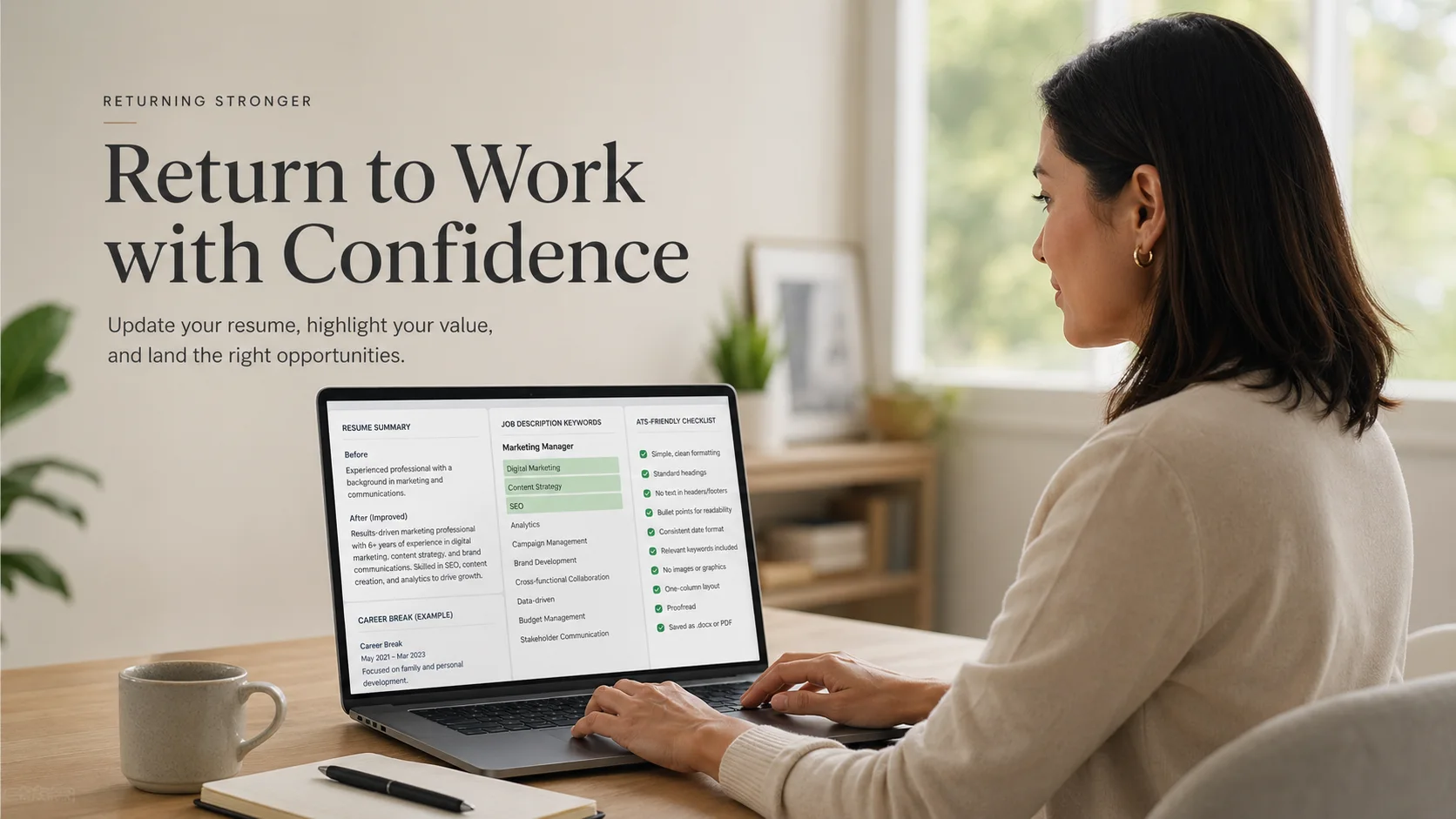
An ATS-friendly resume after a career break has one job: help you re-enter the hiring process without letting the gap dominate the whole story.
That does not mean hiding the break. It means building a resume that is readable for applicant tracking systems, specific enough for recruiters, and honest enough to hold up in an interview.
People returning after a career break often still have solid experience, but their resume no longer presents it well. The last role may be years old. Job descriptions may use different language. Expectations may have shifted. The result is usually one of two problems: the gap takes over the document, or the resume avoids it so awkwardly that the gap becomes the first thing a recruiter notices.
AI can help, but only if you use it with structure. A blank AI chat can produce polished wording that says very little. A better workflow helps you update older experience, align with the target role, explain the break briefly, and keep each application version under control.
Short Answer
A strong ATS resume after a career break should do four things well:
- Explain the break briefly if the timeline needs it
- Translate older experience into current role language
- Match the job description without copying it
- Use simple formatting that ATS systems can read
The goal is not to make the break disappear. The goal is to make your current fit easier to see.
For most return-to-work applicants, the strongest resume does not lead with the gap. It leads with relevant capability, transferable skills, recent learning, and proof from previous work.
Who This Guide Is For
This guide is for people returning to work after a visible career break, whether the break was for family, caregiving, health, relocation, study, burnout recovery, parenting, or another personal reason.
It is especially useful if your old resume still shows real experience, but no longer feels aligned with the jobs you want now.
The goal is not to explain every detail of the gap. The goal is to rebuild a resume that shows current readiness, relevant skills, and a clear direction.
Why Career Break Resumes Need a Different Strategy
A standard resume assumes a more continuous career path. A return-to-work resume has to answer a few extra questions quickly:
- Are your skills still relevant?
- Are you ready to return now?
- Does your previous experience still match this role?
- Is the timeline clear enough?
- Can you step into the job with confidence?
A weak resume leaves those questions hanging. A stronger resume answers them through structure. Your summary should point to the role you want now. Your skills should reflect the job description. Your work history should emphasize durable strengths, not outdated task lists. Courses, certifications, projects, volunteering, or self-directed learning can help, but only when they strengthen the return story.
What Most Return-to-Work Resumes Get Wrong
Many resumes after a career break fail because they overcorrect.
Some explain the break too heavily. They turn the resume into a personal story full of family, health, relocation, or burnout details. Others ignore the break completely, which can make the timeline look confusing or evasive.
The better approach is balanced. Mention the break when needed, but make the resume mainly about readiness.
Weak:
- Took time away from work for personal reasons and now looking to restart my career.
Stronger:
- Returning to operations coordination after a planned career break, with prior experience in scheduling, stakeholder communication, reporting, and process follow-up.
The stronger version does not overexplain. It gives direction, relevance, and confidence.
One Quick Before-and-After Example
Weak:
- Returning to work after a career break and looking for a new opportunity.
Stronger:
- Administrative coordinator returning after a planned career break, with prior experience in scheduling, documentation, customer communication, and Excel-based reporting.
The stronger version does not hide the break. It moves the reader toward current fit.
Better Resume Summary Example After a Career Break
Weak summary:
- Returning to work after a career break and looking for an opportunity to use my skills again.
Stronger summary:
- Administrative and operations support professional returning after a planned career break, with prior experience in scheduling, documentation, customer communication, Excel reporting, and process follow-up. Currently focused on administrative coordinator and operations support roles where accuracy, organization, and stakeholder communication are important.
The stronger version works because it names the target direction, connects older experience to useful functions, and keeps the break brief.
How to Give AI the Right Resume Material
AI works best when you give it real source material. Do not ask it to “write me a resume after a career break” and expect a strong result.
Give it:
- Your old resume
- The exact job description
- Your target role
- Your career break dates
- Any recent learning, certifications, projects, or volunteer work
- Skills you can prove in an interview
- Skills you do not want it to invent
Then ask AI to improve alignment, not exaggerate.
A useful instruction might be:
“Rewrite this resume for an operations support role. I am returning after a three-year career break. Keep the break brief and neutral. Do not invent experience. Prioritize transferable skills from my previous administrative work. Use ATS-friendly headings and match relevant language from the job description naturally.”
Where to Mention the Career Break
You usually have three options.
First, mention it briefly in the summary if the break is recent and visible.
Second, include it as a short entry in the experience section if the timeline needs clarity.
Example:
Planned Career Break | 2021–2024 Focused on family responsibilities while maintaining professional development through Excel refreshers, project coordination practice, and industry research.
Third, leave it out of the summary if you have already returned to work and the gap no longer needs top-level attention.
The key is restraint. You are not trying to justify your life. You are helping the reader understand the timeline quickly.
What Not to Put in the Career Break Section
The career break entry should not become a personal explanation. Keep it professional and short.
Avoid details like:
- Medical history
- Family conflict
- Financial stress
- Burnout details
- Long explanations of why you left
- Apologetic language
- Overly emotional wording
- Claims that sound like fake consulting or freelance work
A resume is not the place to defend the break. It is the place to clarify the timeline and move the reader back to your fit for the role.
What AI Should Help You Rewrite
AI is especially useful for updating older experience.
Older resumes often use flat wording:
- Responsible for reports
- Helped customers
- Managed office tasks
- Supported team communication
- Used Excel
A better AI-assisted version might say:
- Prepared weekly Excel reports to support planning, issue tracking, and follow-up decisions.
- Coordinated customer requests across email and phone channels, resolving routine issues and escalating urgent cases.
- Maintained records and documentation to support daily operations.
These bullets are still honest, but they are more useful for both ATS systems and recruiters.
What AI Should Not Do
AI should not fill your career break with fake consulting, fake freelance work, fake certifications, or inflated projects.
It should not turn informal responsibilities into achievements you cannot explain. It should not claim software experience you only watched in a tutorial. It should not make the break sound more strategic than it really was.
Use AI to clarify, compress, and tailor. Do not use it to create a version of your career that will collapse in an interview.
How to Make the Resume ATS-Friendly
ATS-friendly does not mean robotic. It means readable.
Use standard headings such as:
- Professional Summary
- Skills
- Work Experience
- Education
- Certifications
- Projects
Avoid text boxes, columns, icons, graphics, unusual headings, and heavily designed layouts. They can look attractive, but they may create parsing problems in some ATS systems.
Use job-description language carefully. If a role asks for “stakeholder communication,” do not only say “worked with people.” If it asks for “Excel reporting,” do not hide Excel in a generic skills list.
A Simple Resume Structure After a Career Break
A strong return-to-work resume does not need a complicated layout. A simple structure usually works best:
1. Professional Summary Focus on the target role, relevant experience, and current readiness.
2. Skills Match the most relevant tools, systems, and responsibilities from the job description.
3. Recent Learning, Projects, or Certifications Add this only if it strengthens your return story.
4. Work Experience Rewrite older roles around durable skills, tools, stakeholders, and outcomes.
5. Career Break Entry Include this only if it helps explain the timeline.
6. Education Keep it simple and relevant.
This structure keeps the gap visible enough to avoid confusion, but not so prominent that it becomes the main story.
A Practical AI Workflow for Returners
Start with one target role, not ten.
Choose a job description that reflects the kind of job you actually want. Then build a base resume around that direction:
- Identify the role’s core requirements.
- Map your old experience to those requirements.
- Update the summary and skills section.
- Rewrite older bullets using evidence.
- Add a brief career break entry only if it helps the timeline.
- Export a clean PDF and save the version for that role.
This is where a structured workflow can help. A tool like HireDraftAI can keep your resume profile, job-specific tailoring, ATS guidance, PDF-ready exports, and application history connected instead of spreading everything across scattered drafts.
What the Resume Should Say vs. What the Cover Letter Should Say
Your resume and cover letter should not do the same job.
The resume should stay focused on skills, experience, keywords, and proof. It should mention the career break only as much as needed for timeline clarity.
The cover letter can carry a little more context. That is where you can briefly explain that you are returning after a planned break, why the role fits your background now, and what makes you ready to contribute.
A simple line could be:
- After a planned career break, I am now returning to administrative and operations support work, where my previous experience in scheduling, documentation, customer communication, and Excel-based reporting is directly relevant.
This keeps the message calm and professional without overexplaining.
How to Tailor Each Application Without Starting Over
People returning after a gap often make one of two mistakes: they send the same resume everywhere, or they rewrite everything for every job until the process becomes exhausting.
The better approach is controlled tailoring. Keep a strong base resume, then adjust:
- The summary
- The skills order
- The most relevant bullets
- The wording around tools and responsibilities
- The cover letter connection
Do not rewrite your entire career every time. Tailor the evidence that matters most for that role.
What to Check Before Sending
Before you submit, review the resume like a recruiter would:
- Can someone understand my target role in 10 seconds?
- Is the career break clear but not overexplained?
- Do my skills match the job description language?
- Are my bullets specific enough to prove experience?
- Is the formatting ATS-safe?
- Could I defend every line in an interview?
- Do I know which version I sent to this employer?
That last point matters more than people think. If you are applying to multiple roles, version control becomes part of the job search.
Approved Free Tool CTA
Create a return-to-work summary that explains the comeback without hiding the gap.
Primary free tool: returning-to-work resume summary generator.
Source and Editorial Note
This article was reviewed after manual SEO approval on 2026-07-05. It uses official and primary references where claims need grounding, and it avoids claiming that a resume score, keyword tool, or AI workflow can guarantee interviews.
FAQs
Should I mention a career break on my resume?
Yes, if the gap is recent or long enough to confuse the timeline. Keep it brief, neutral, and professional.
Can AI help write a resume after a career break?
Yes, if you give it strong source material. AI can improve wording, structure, and alignment. It should not invent experience or exaggerate skills.
Where should I put a career break on my resume?
You can mention it in the summary, include it as a short timeline entry, or leave it out of the summary if you have already returned to work.
How do I make older experience look relevant again?
Focus on durable skills, responsibilities, tools, and outcomes. Rewrite old bullets around functions that match the role you want now.
What should I avoid when using AI for a return-to-work resume?
Avoid fake consulting, inflated titles, invented certifications, exaggerated projects, and software skills you cannot explain in an interview.
Final Verdict
A strong ATS resume after a career break is not about hiding the gap. It is about rebuilding a clear professional signal.
The best return-to-work resumes are calm, honest, and targeted. They explain the timeline only as much as needed. They bring older experience back into current language. They use keywords naturally. And they show that you are ready now.
If you want to rebuild your return-to-work application in a more organized way, HireDraftAI can help you turn one resume profile into tailored resumes, matching cover letters, ATS guidance, PDF-ready documents, and tracked applications, so every version stays clear, honest, and role-specific.